
Overview of Matter Casting
With Matter Casting, customers can start content on their iOS or Android phone, cast it to a Fire TV or Echo Show, and control playback from the phone. Your app does not need a proprietary casting protocol.
This overview introduces the key concepts and terminology you need to understand before you integrate Matter Casting into your Fire TV and mobile apps. Once you are familiar with these concepts, continue to the Matter Casting Integration guide for step-by-step code implementation.
- What you can do with Matter Casting
- Prerequisites
- Key concepts and terminology
- Commissioning
- Additional resources
- Related topics
What you can do with Matter Casting
Integrating Matter Casting into your Fire TV and mobile apps gives your app a number of advantages:
- It supports media and device controls such as play, pause, navigation, skip forward, back, and volume for customers to control the viewing experience on TVs directly from their phone.
- It works with your app that runs on Fire TV or Echo Show devices.
- It enables customers to browse for content or begin watching content on their phone and cast it to their compatible Fire TV device or Echo Show device.
- It can assist with the installation of your app on a Fire TV or an Echo Show device if your Fire TV app is not already installed.
Prerequisites
Before you integrate Matter Casting into your Fire TV and mobile apps, you must have the following:
- Development environment for Android or iOS, preferably with Android Debug Bridge (ADB) access, an IDE, and a simulator.
- Access to the source code of your Fire TV and iOS or Android mobile app.
- A Fire TV device that supports Matter Casting. This includes most devices that run Fire OS 7 or higher.
- The latest Matter specification from the CSA's website for reference. We recommend downloading the Core, Device Library, and Application Cluster specification. Matter Casting is defined in the Media section in the Application Cluster specification.
Key concepts and terminology
The following sections introduce the core concepts and terminology you need before integrating Matter Casting. It covers the primary roles in a casting interaction (the player, client, and content app), a terminology table summarizing the key terms used throughout this documentation, and the clusters that expose the commands a client uses to control a player or content app.
For more information, see these resources:
- Official Matter documentation on the Connectivity Standards Alliance (CSA) website.
- Matter's GitHub repository for additional open-source sample apps.
- The Matter 1.5 specification for the official protocol definition.
Roles: player, client, and content app
In Matter Casting, a role describes the purpose that each device or app serves in a casting interaction. Throughout this documentation, we refer to the devices and apps involved in a casting interaction as follows:
-
Player: Your Fire TV and Echo Show devices are casting video players. The player renders media to a physical output or built-in display screen.
-
Client: Your Android or iOS mobile app. The client discovers players on the network, initiates casting, and controls playback.
-
Content app: Your Fire TV app. The content app runs on the player and receives commands from the client.
The client controls either the player itself (such as changing the Fire TV's output volume) or a specific content app running on it.
Summary of terminology
Along with the roles above, the following table summarizes the key terms used throughout this documentation.
| Term | Definition |
|---|---|
| Player | Casting video player. |
| Client | Android or iOS app. |
| Content app | Fire TV app. |
| Fabric | Devices or apps in a network that share the same security domain. |
| Commissioning | The process of a client joining the fabric. |
| Commissioner | The player that a customer casts to. |
| Commissionee | The client that discovers players on the network. |
| User Directed Commissioning (UDC) request | The message that the client sends to the player. |
| Device Attestation Certificate (DAC) | Validates the identity of the client, by determining the client vendor, and determining which content apps the client is authorized to cast content to. |
| Client vendor | Information provided for the player to validate the identity of the client and determine which content apps must be granted access. |
Clusters
In Matter, a cluster groups related functionality that a player or content app exposes for the client to control its behavior. Each cluster defines a feature or experience you can support for casting. For example, your content app can support D-pad navigation (Keypad Input cluster), playback controls (Media Playback cluster), or user login (Account Login cluster).
Fire TV supports the following video player and content app clusters.
| Cluster Name | Target | Description |
|---|---|---|
| On / Off | Video player | Turn Fire TV on or off. |
| Account Login | Content app | Commands enabling the user to log into their account. |
| Application Launcher | Content app | Interface to launch an app or app install flow on a video player device. |
| Keypad Input | Content app | Controls a video player or a content app using action commands such as UP, DOWN, and SELECT. |
| Media Playback | Content app | Controls media playback (PLAY, PAUSE, etc) on a video player device. |
| Target Navigator | Content app | Interface for UX navigation within a set of targets. |
| Content Launcher | Content app | Launches specific content within a content app on a video player device. |
Commissioning
Commissioning is the process of securely connecting a client to a player so that they can communicate. In Matter, the network that commissioned devices share is called a fabric, a set of devices that share the same security domain. Commissioning happens only once, the first time a customer casts to a player. In this process, the player is the Commissioner and the client is the Commissionee.
Commissioning proceeds through the following steps, from discovering players on the network to adding the client to the player's fabric:
- Device discovery. The client (Commissionee) discovers players on the network using DNS-Based Service Discovery (DNS-SD) and presents the resulting list of casting targets to the user.
- Target player selection. The user selects a target player, and the client sends a message to that player to request commissioning. This message is called a UDC request. It can contain information about the client, how it would like to be commissioned (whether and how to display a passcode entry dialog), and the content app it would like to cast to.
- Passcode exchange. The player checks whether it has a content app corresponding to the information in the UDC request, then attempts to obtain a passcode and the discriminator for the commissioning process. A content app can provide these, or the user can input them. The passcode is an 8-digit numeric code required to establish a secure connection between the player and the client.
- Secure connection and commissioning. Once the player and client establish a secure connection using the passcode, they exchange operational certificates to commission the client onto the player's Matter fabric. During this exchange, the client provides its DAC. With the DAC, the player can validate the identity of the client (determine the client's vendor) and determine which content apps the client is authorized to cast to.
After commissioning completes, the client and player establish a CASE (Certificate Authenticated Session Establishment) session. The client caches this connection information so that on subsequent sessions, it can re-establish the CASE session directly without repeating the commissioning process.
For step 3, Fire TV supports two methods for obtaining the passcode. Your implementation choice depends on whether you build a cloud service to route the passcode.
Method 1: Manual passcode entry in the client (recommended)
When the client connects for the first time to a player, if the corresponding content app does not support the Account Login cluster, or if the GetSetupPIN command does not return a passcode (for example, due to a TempAccountIdentifier mismatch or a cloud lookup failure), the user must manually enter the passcode into the client.
In this scenario, the flow follows these three phases:
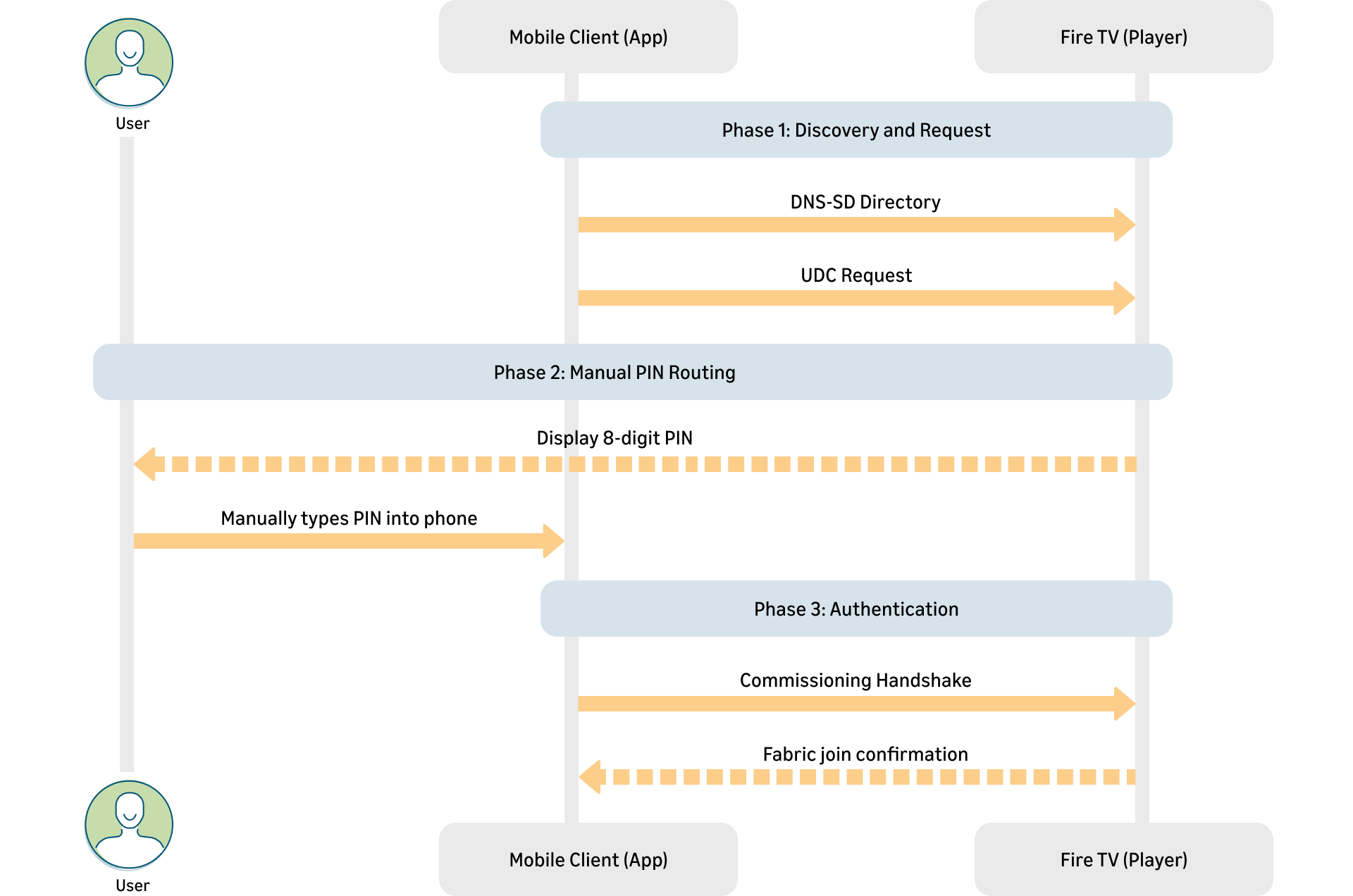
- Phase 1 Discovery and Request: The client discovers the player through DNS-SD and sends a UDC request indicating it is ready to connect.
- Phase 2 Manual PIN Routing: The player generates an 8-digit passcode and displays it on the screen. The user manually types this passcode into the client.
- Phase 3 Authentication: The client provides the passcode and its DAC to the player. The player validates the passcode and DAC, and successfully adds the client to its fabric.
Method 2: Through the content app
When the client connects for the first time to a player, the player identifies the corresponding content app from the UDC message. Then, it checks whether that app implements the Account Login cluster by reading its static_matter_cluster file. If the cluster is present, using the content app to obtain the passcode allows the player to commission the client without any manual entry by the user.
In this scenario, the flow follows these three phases:
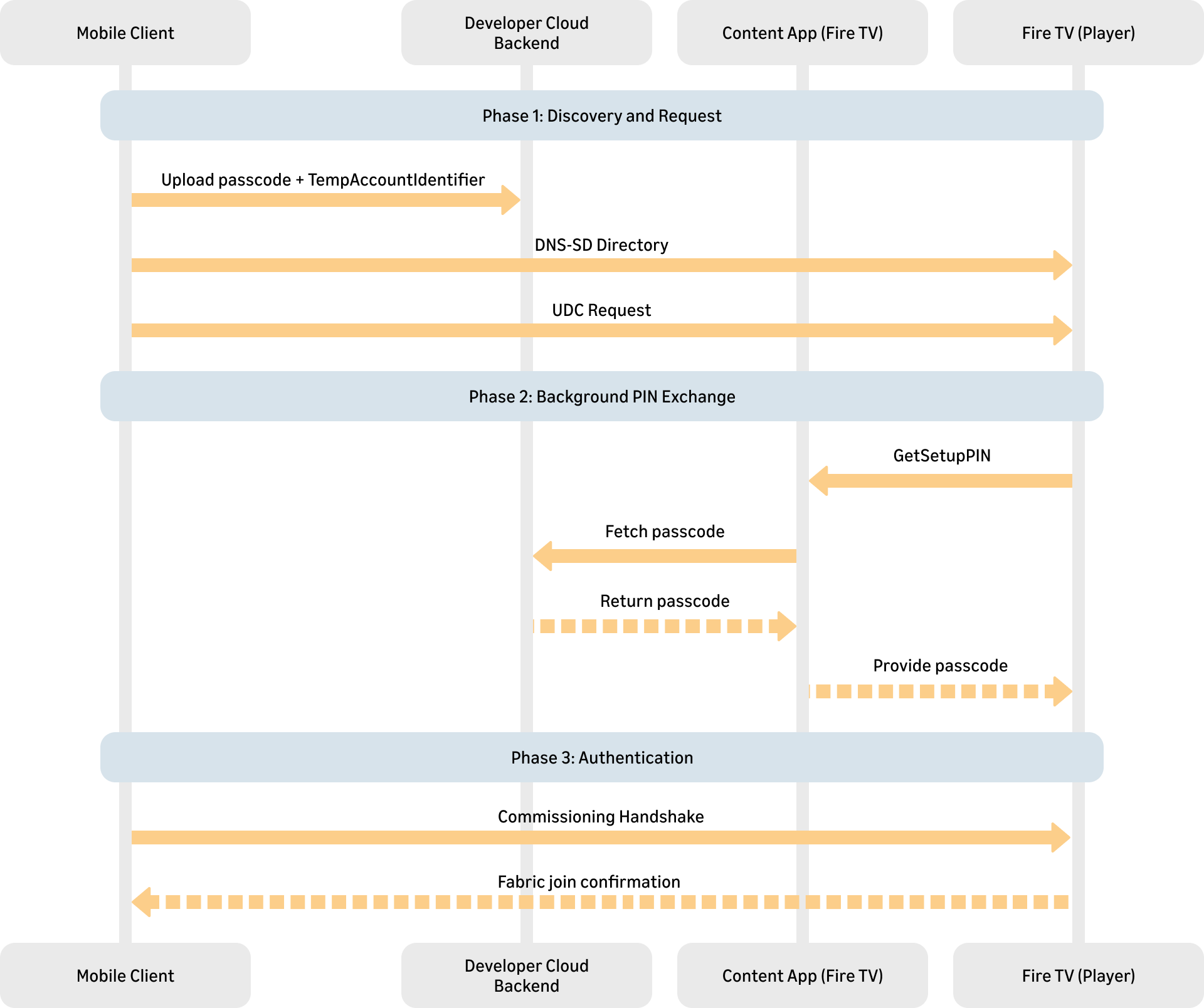
- Phase 1 Discovery and Request: The client uploads the passcode and a
TempAccountIdentifier(a rotating ID token) to the developer's cloud service, then discovers the player through DNS-SD and sends a UDC request that includes the sameTempAccountIdentifier. - Phase 2 Background PIN Routing: The player invokes the
GetSetupPINcommand on the content app, passing theTempAccountIdentifier. The content app fetches the matching passcode from the cloud service and returns it to the player, all without the user's physical entry of a Setup PIN. - Phase 3 Authentication: The client provides the passcode and its DAC to the player. The player validates the passcode and DAC, then adds the client to its fabric.
GetSetupPIN, the player invokes the cluster's login and logout commands to signal when a client's access is added or removed. Method 2 requires the content app to implement the Account Login cluster and a cloud service that can relay the passcode; if the content app can't return a passcode, the player falls back to Method 1.App attestation
During the commissioning process, Matter Casting requires that the client provides attestation information to the player. This attestation information makes it possible for the player to validate the client identity and determine which content apps must be granted access. Each content app includes information in its Android manifest file, which designates clients that will be granted access. The player uses this information to match a content app with one or more clients. Attestation in Matter is done using a DAC, and a Certification Declaration (CD). For more details on the attestation procedure and DAC, see App Attestation.
Additional resources
- The client SDK for iOS and Android can be built from the source using the code found on Matter’s Github repo.
- The source code for a sample content app running on the player can be found on Matter’s Github repo at content-app.
Related topics
Last updated: Sep 02, 2026
