
Bring Your Own Auth Overview
Overview
The Bring Your Own Auth (BYOA) API enables you, as a third-party partner, to integrate your own authentication devices (such as facial recognition cameras, palm scanners, or badge readers) with Just Walk Out(JWO) enabled store gates.
This integration allows your authentication device to signal Amazon's cloud to open the JWO gate remotely via a standardized Cloud Entry Signal API. In this model, your device authenticates the shopper, then signals Amazon's cloud through two sequential synchronous API calls. Amazon's cloud validates each request, and on the final call, sends a remote gate open command to the JWO gate hardware and returns the result back to your system.
Considerations
- Your authentication device and cloud service are fully owned and maintained by you. Amazon has no operational ownership of your device.
- Your device has no physical or network connection to the Amazon gate hardware. All communication happens via cloud APIs.
- The API is split into two sequential synchronous REST calls: startAuth (reserves the gate) followed by processAuth (delivers your auth decision and triggers gate action).
- Your authentication system can be a device backed by your own cloud service, or a single device that calls the Cloud Entry Signal API directly. Either architecture is supported.
- Device Registration is a one-time setup to pair your authentication device with a specific JWO gate.
- A Heartbeat API must be integrated for Amazon to monitor the availability of your authentication device.
- All API calls are authenticated via AWS IAM Signature Version 4 (SigV4).
Once integration is complete, your shoppers will experience seamless gate entry using your authentication method, powered by Amazon's Just Walk Out technology.
Service Level Requirements
Your integration must meet the following performance and availability targets:
| Metric | Requirement | Notes |
|---|---|---|
| Availability | 99.95% | Your cloud service must be available for API calls. |
| Per-API-call Timeout | 10000ms | Maximum time your system should wait for a response from Amazon before treating it as a timeout. Typical responses are much faster; this value allows entry to keep working during latency regressions. |
| Heartbeat Frequency | At least once per minute | Recommended: once every 30 seconds. |
| Monitoring and Alarming | Detect issues within 5 minutes | You must operate your own monitoring and alarming for your authentication system (e.g., API errors, elevated latency, device outages). If your system fails, shoppers cannot enter the store through your authentication method. |
Authentication
All API requests must be authenticated using AWS IAM (SigV4). Each merchant is provisioned with AWS credentials during onboarding. API calls are authorized at the store level, your credentials are scoped to the stores you own, preventing cross-merchant access.
Endpoint Infrastructure
All APIs are accessed via regional endpoints under the amazonphysicalstores.com domain. The specific subdomain and base URL will be provided during your onboarding process.
The endpoint can vary per store (for example, some stores use us-east-1 and others use us-west-2). Your integration must support configuring the endpoint per store rather than using a single endpoint for all stores.
Idempotency
The processAuth API is idempotent - if you retry a processAuth call with the exact same inputs (same authEventId, personId, authResult), the system will not create a duplicate shopping journey. This allows you to safely retry after a network error or client-side timeout.
Why is a gate reservation needed?
A JWO gate can have multiple entry methods installed at the same time, such as your BYOA device, a QR code reader, or a credit card reader attached to the gate. startAuth reserves the gate for your device so that another entry method cannot start an entry on the same gate while your authentication is in progress. This prevents conflicting entries, such as two shoppers being admitted by different entry methods for a single gate opening.
Integration Flow Overview
The following sequence describes the end-to-end integration flow from device setup through authenticating a shopper at the gate.
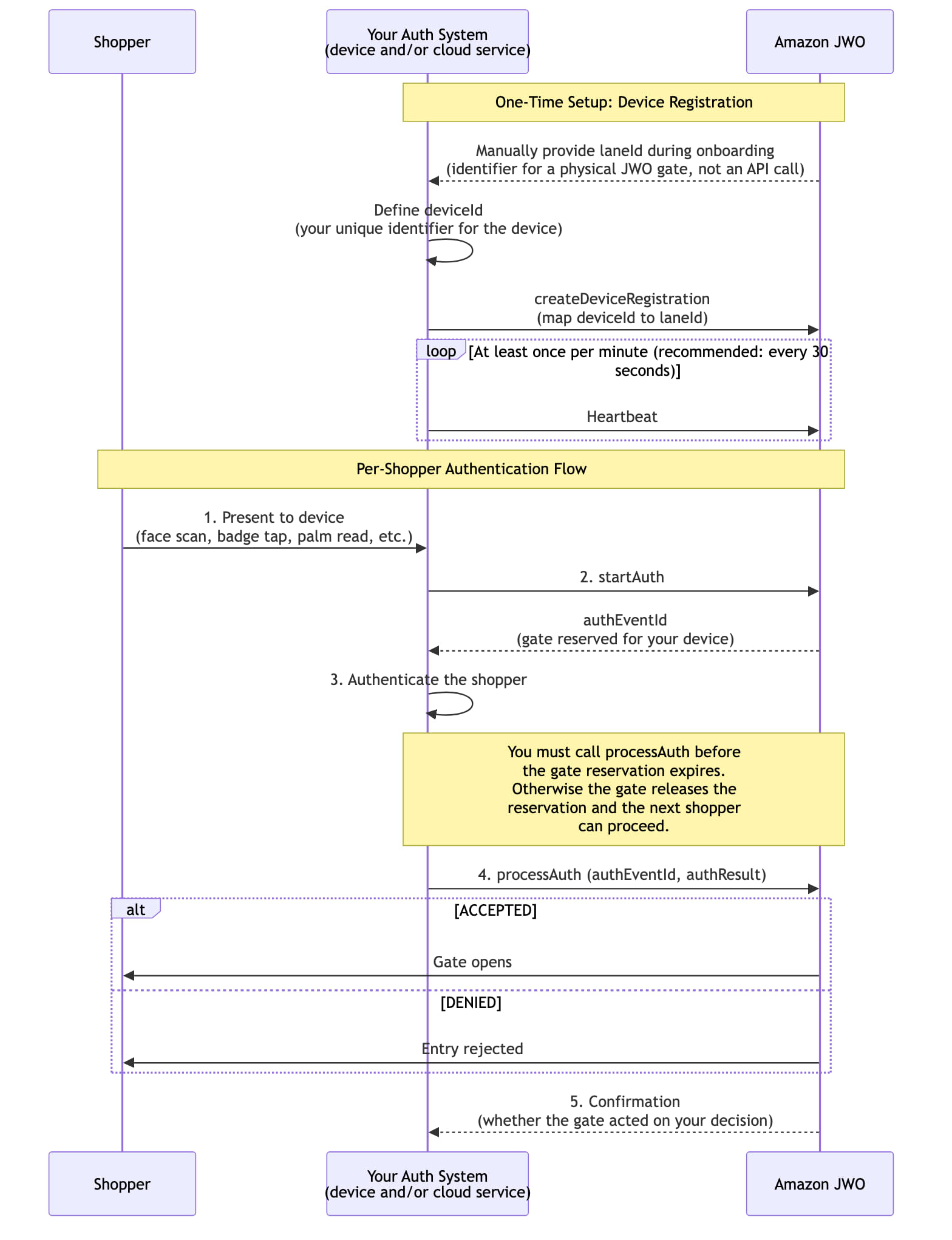
"Your Auth System" can be a single device that calls the Cloud Entry Signal API directly, or a device backed by your own cloud service that makes the API calls. The laneId is provided to you manually by Amazon during onboarding; there is no API to retrieve it.
Happy case - shopper authenticated, gate opens
After a successful processAuth (authResult = ACCEPTED), the authEventId (from startAuth response/processAuth request) will map to the shopper's cart and checkout process.
Step 1: Device calls startAuth; the lane locks and an authEventId is returned.
POST /auth/v2/startAuth

// Request
{I do
  "storeId": "<STORE-ID>",
  "deviceId": "card-reader-1",
  "timestamp": 1791475645000, // epoch millis when sending the request
  "authTimeout": 15000        // optional: lane lock duration in ms (0-15000), default 15000
}

// Response: 200
{
  "authStarted": true,
  "authEventId": "123456-1b3d-4e8a-9c6f-2d5b8a1e7f30", // pass to processAuth
  "reason": null,
  "timestamp": 1791475645120,
  "startAuthMetadata": []
}
Step 2: Retailer authenticates the shopper and calls processAuth with that authEventId and ACCEPTED; the gate opens.
POST /auth/v2/processAuth

// Request
  {
    "storeId": "STORE_1",
    "deviceId": "card-reader-1",
    "authEventId": "123456-1b3d-4e8a-9c6f-2d5b8a1e7f30", // from startAuth
    "personId": "8b1e4d2c-6a7f-4c3e-9d5a-1f2e3b4c5d6e",    // retailer's UUID for the shopper
    "personType": "SHOPPER",
    "authResult": "ACCEPTED",                              // ACCEPTED or DENIED
    "timestamp": 1791475647000                             // epoch millis when sending the request
  }

// Response: 200
  {
    "authProcessed": true,
    "reason": null,
    "timestamp": 1791475647310,
    "processAuthMetadata": []
  }
Step 3: After the shopper exits, Amazon calls the retailer's ordering connector with the cart (sample payload reference). Match it to the entry using shoppingTrip.authEvents[].id, which is the authEventId from startAuth/processAuth (e.g. to capture the pre-auth keyed to that entry). shopperIdentity.id is the personId.
See the Create Purchases API documentation for more details on purchase processing. There, if you inspect the field shoppingTrip.authEvents, you will see a list of auth events with ids, each of which correlates with an authEventId from a startAuth/processAuth call.
Why can a shopping trip have multiple authEvents? A single shopping trip can include more than one entry when
the same credential is used for successive entries by people shopping together. For example, one shopper taps a
credit card and enters, then a companion uses the same credit card to join them. If you pass the same personId for
successive entries and Amazon's cameras observe that the shoppers are shopping together, the entries are combined into
a single shopping trip. In that case, authEvents contains one entry per gate entry, each with its own authEventId, so
your ordering logic must handle more than one authEvent per shopping trip.
{
  "requestId": "daee6570-4953-4696-85e7-e60998a6a290",
  "idempotentShoppingTripId": "<SHOPPING-TRIP-ID>",
  "storeId": "<STORE-ID>",
  "shoppingTrip": {
    ...
    "authEvents": [
      {
        "id": "123456-1b3d-4e8a-9c6f-2d5b8a1e7f30", // authEventId from startAuth/processAuth
        ...
      }
    ]
  },
  "cartItems": [...],
  "shopperIdentity": {
    "id": "8b1e4d2c-6a7f-4c3e-9d5a-1f2e3b4c5d6e" // personId from processAuth
  },
  ...
}
Exception case: Shopper denied - gate stays closed
Step 1: startAuth is the same as Scenario 1. The retailer rejects the shopper and calls processAuth with DENIED; the gate shows a denied message and stays closed.
POST /auth/v2/processAuth

// Request
    {
        "storeId": "<STORE-ID>",
        "deviceId": "card-reader-1",
        "authEventId": "123456-1b3d-4e8a-9c6f-2d5b8a1e7f30", // from startAuth
        "personType": "SHOPPER",
        "authResult": "DENIED",
        "deniedReason": "BAD_DEBT",                            // optional: BAD_DEBT or ACCOUNT_NOT_FOUND
        "timestamp": 1791475647000                             // epoch millis when sending the request
    }

// Response: 200
  {
    "authProcessed": true,
    "reason": null,
    "timestamp": 1791475647310,
    "processAuthMetadata": []
  }
Note: No shopping session is created, so there is no ordering connector call for this entry.
Sample Error Responses
| Status Code | Meaning | Description |
|---|---|---|
| 400 | Unknown storeId | The store isn't onboarded for BYOA, or the ID is mistyped. Applies to every API. |
| 400 | Invalid field | A field fails validation (missing, wrong format, out of range). The response lists each violation. Applies to every API. |
| 403 | Not authorized | Requests that aren't SigV4-signed, or come from a caller that isn't allowlisted, get a standard AWS 403. |
| 400, 404, 409, 503 | Modeled error | startAuth and processAuth return their normal response with authStarted / authProcessed set to false and a reason. For example, LANE_BUSY (409) when startAuth is called while another auth holds the lane. See the per-API Errors sections linked below. |
Unknown storeId
POST /auth/v2/startAuth

// Request
{
  "storeId": "STORE_9", // not an onboarded store
  ...
}

// Response: 400
{
  "code": "BadRequest",
  "message": "Invalid request"
}
Invalid field
POST /auth/v2/startAuth

// Request
{
  ...
  "authTimeout": -1 // must be 0-15000
}

// Response: 400
{
  "violations": [
    { "field": "authTimeout", "message": "must be at least 0" }
  ]
}
Modeled error (startAuth while another auth holds the lane)
POST /auth/v2/startAuth

// Response: 409
{
  "authStarted": false,
  "authEventId": null,
  "reason": "LANE_BUSY",
  "timestamp": 1791475645120,
  "startAuthMetadata": []
}
For the full list of modeled error reasons and how to handle them, see startAuth errors and processAuth errors.
