
ウェブアプリのウェブワーカーに関するベストプラクティス
ウェブワーカーは、JavaScriptをメインブラウザスレッドとは独立してバックグラウンドで実行できるようにするモダンウェブブラウザの機能です。詳細については、ウェブワーカーの使用を参照してください。
この実行モデルは、メインスレッドで非同期操作を管理する並行処理ではなく、本当の並列処理です。並行処理のコードでは、非同期タスクの計算負荷が高いとUIのブロッキングを防ぐことができませんが、ウェブワーカーでは、作業をオフロードすることで明示的にUIのブロッキングを防止します。このように、ウェブワーカーは適切に使用すれば強力なツールになります。
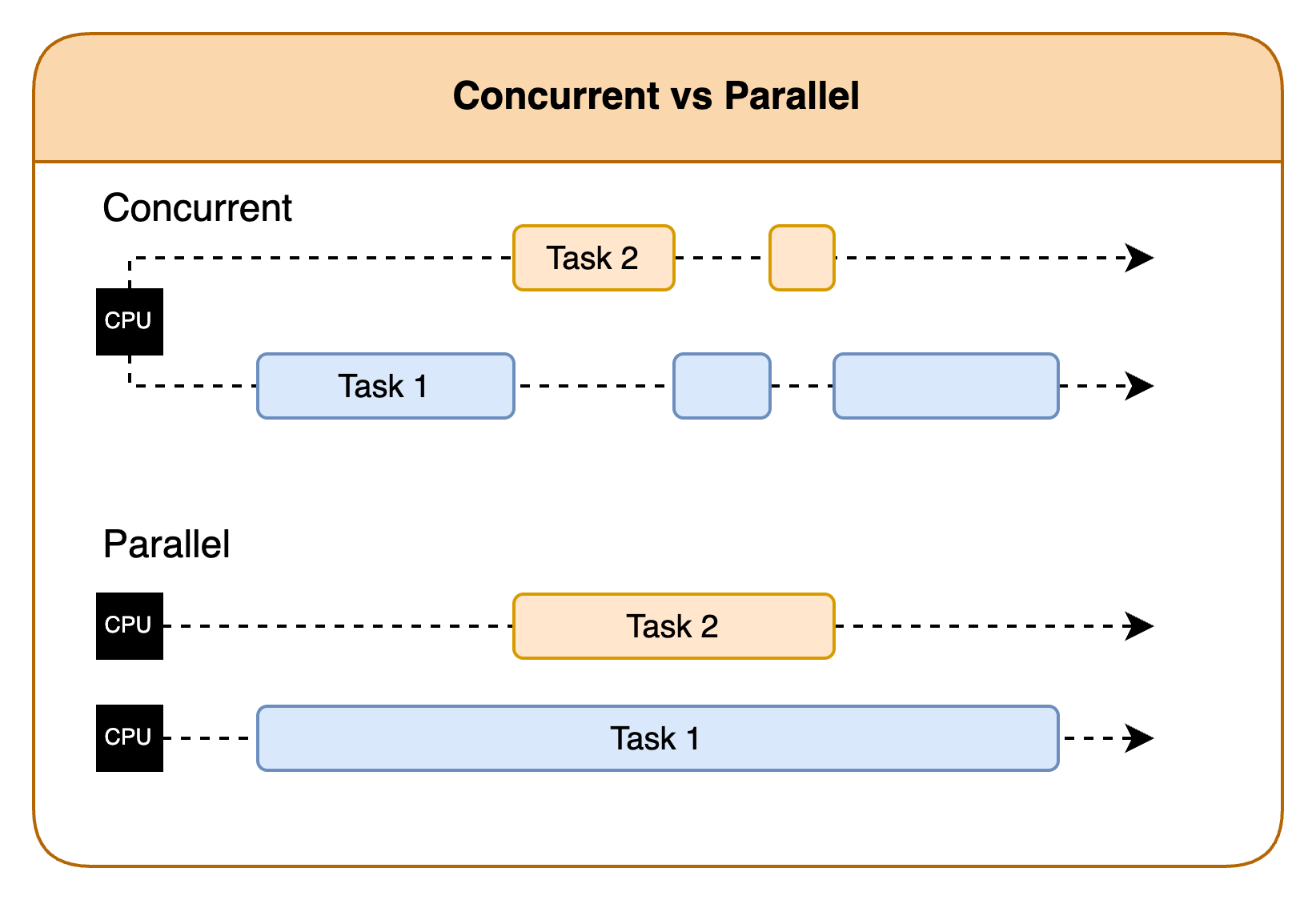
Chromiumで使用されるレンダリングエンジンはBlinkです。このエンジンでは、ウェブアプリのパフォーマンスを最大化するように設計されたスレッドプールアルゴリズムが使用されます。これは固定スレッドプールやキャッシュスレッドプールよりも複雑で、小規模なワーカーの大量呼び出しに優れています。Blinkは、CPUコア間で並列処理と並行処理のバランスを取ってコアを最大限に使用します。Chromiumは、リソース制限やサンドボックスなどのスレッドとリソースを管理します。作成するウェブワーカーの数を決定するのはウェブアプリの役割で、タスクの種類、複雑さ、利用可能なシステムリソースに基づいて適切な数を設定します。ワーカーとメインスレッド間の通信を管理します。ウェブアプリはさらに、バッチ処理、優先順位の決定、一度に送信されるワーカー数の制限などの戦略を使用して、通信のオーバーヘッドを最小限に抑える必要もあります。
Vega WebViewでのウェブワーカー
Vegaはリソースの少ないデバイスで動作することが多いため、スレッドの数はデバイスのコアの数に制限してください。JavaScriptには、デバイスに搭載されているコアの数を特定するnavigator.hardwareConcurrencyが用意されています。最小仕様のデバイスのコアは4個ですが、ハイエンドのデバイスにはより多くのコアが搭載されています。使用されるアルゴリズムは、number_of_workers = (2 * number_of_cores) + 1です。たとえば、デバイスに4つのコアがある場合、最大9つのワーカーを使用します。場合によっては、ワーカーの動作に応じて、システムはこれよりも小さい数や大きい数に対応することがあります。ウェブワーカーのライフサイクルを理解すると、このような状況のいくつかに説明がつき、リソースの過剰な登録が問題となる理由もわかります。
ウェブワーカーの通常のライフサイクルは、次の内容で構成されます。
- 新しいワーカーを作成するメインスレッド
- メッセージをポストする
- ワーカーがメッセージを処理する
- システムはメインスレッドに新しいメッセージを送信する
- メインスレッドは返されたメッセージを処理するメインスレッドとの通信は、メインスレッドのパフォーマンスに影響を及ぼします。ほぼ同時に処理を終えてメインスレッドにデータを返す小規模なワーカーが多いと、メインスレッドに影響を及ぼします。この影響は、レスポンスが同時実行で処理される場合でも発生します。
以下では、ウェブワーカーのパフォーマンスを最大限に高めるための戦略をいくつか示します。
Vega向けのウェブワーカーのガイドライン
- ウェブワーカーは本当に有益なタスクに使用し、それらがどのイベントによってトリガーされるかを把握して注意を払います。ウェブワーカーの数が多すぎると、Fire TV Stick 4K Selectなどのリソースの少ないデバイスは過負荷になる可能性があります。
- ワーカーとメインスレッド間で受け渡されるデータの量を削減します。
- 大量のデータのコピーが行われるのを避けるために、移譲可能オブジェクトを使用します。
// 大量のデータのコピーが行われるのを避けるために、移譲可能オブジェクトを使用します
const data = new Uint8Array(1024 * 1024); // 1MBのデータ
worker.postMessage(data, [data.buffer]); // 基になる配列バッファを転送する
- 大量のデータのコピーが行われるのを避けるために、移譲可能オブジェクトを使用します。
- ワーカーを管理し、いつ不要になるかを把握します。
terminateを使用して不要なワーカーを削除し、すべてのワーカーが同時に終了してメインスレッドがあふれないようにします。// 不要になったワーカーを終了します。 worker.terminate(); - 新しいワーカーを生成する代わりに、可能な場合はワーカーまたはワーカープールを再利用します。
const worker = new Worker('worker.js'); worker.postMessage('メインスレッドからの指示'); // ... その後 ... // 新しいタスクをポストしてワーカーを再利用します。 worker.postMessage('新しいタスク'); - キャッシュを使用して再計算を減らします。
// 効率的なIDベースの検索にはMapを使用する const cache = new Map<string, CachedData>(); self.onmessage = async (event: MessageEvent) => { const { type, payload } = event.data; const { id, forceRefresh } = payload; // データが既にキャッシュにあるかどうかを確認します if (cache.has(id) && !forceRefresh) { self.postMessage({ type: 'DATA_RESPONSE', payload: cache.get(id).data }); return; } // ... - 特定のコア数で適切に実行できるウェブワーカーの数を把握します。クアッドコアCPUを実行する場合のガイドラインは次のとおりです。
- クアッドコアは1~9個のシンプルなワーカーを適切に実行できます
- クアッドコアは9~15個のワーカーを実行できますが、UIには多少影響があります
- クアッドコアは15~30個のワーカーを実行できますが、明らかな影響があります
- クアッドコアで30個以上のワーカーを実行するのは難しいです
- 使用するワーカーの数を算出するためのアルゴリズムは次のとおりです。
- 常に安全:
number_of_workers = navigator.hardwareConcurrency - 2 - ほとんど安全:
number_of_workers = (2 * navigator.hardwareConcurrency) + 1
- 常に安全:
- 長期間存続するワーカーや負荷の高いワーカーは、同時に実行する数を2~4個にすることを検討します。
- CPU負荷の高いタスクがある場合は、問題を引き起こす可能性のあるワーカーが同時に多数実行されないようにしてください。処理を手動で管理して、システムの過負荷を防ぐことができます。
- 同じファイルが再ダウンロードされないようにヘッダーを設定します。ライブラリの中には、ワーカーを使用して画像やその他のコンテンツをキャッシュするものもありますが、多くのライブラリでは、事前に定義された戦略パラダイムが使用されます。
- TVアプリでは、ナビゲーション時に画像が存在しない場合にワーカーがトリガーされることがよくあります。これは、情報を事前に読み込んで滑らかな動作を実現するためです。これらの画像がキャッシュされないと、すばやいナビゲーションが行われたときにシステムでワーカーが大量に作成され、動作のつっかかりやフリーズが発生しやすくなります。画像を適切にキャッシュに保存するようにヘッダーを適切に設定してください。
- キャッシュ戦略にはいくつかの種類があります。これらのライブラリの多くは、「キャッシュのみ」、「キャッシュファースト」、「ネットワークのみ」、「ネットワークファースト」、「stale-while-revalidate」のいずれかを使用しています。 ライブラリによっては、有効期限を使用するなど、ほかのオプションを使用する場合があります。
関連トピック
Last updated: 2026年4月24日
