

react-native-localize package in your Vega TV app. You can read about the methods supported in the Vega SDK.
The react-native-localize package helps you create a personalized experience for every user:
- Handle multiple languages
- Set date and time formats
- Set currency
- Manage other regional settings
@amazon-devices/react-native-localize library uses Localize React Native in React Native for Vega (RNV) apps. This library provides localization and internationalization support, allowing you to adapt your app to different languages, regions, and cultures.
Why Localize Your TV App?
- User Experience: Users prefer apps that speak their language and understand their regional preferences.
- Global Reach: You can increase your app’s appeal to a broader audience in international markets.
- Legal Compliance: You can ensure compliance with the regulations of various regions.
Installation
-
Add the
react-native-localizepackage as a dependency inpackage.json: -
Import
getCurrenciesinto your preferred component: -
Run
npm installon your project root to install the package. - After a successful installation, run your Vega project.
Examples
Simulator versus device
Return values for the methods in thereact-native-localize package might be different for a simulator than they are for a device. For example, the getCountry() method on a simulator returns US, but for a device, the return value is based on the device’s language setting.
Here’s an example of how to use
@amazon-devices/react-native-localize.
API reference
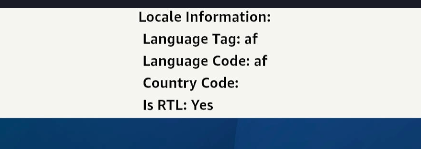
getLocales()
Returns a list of locales based on the user’s device.- languageCode
- scriptCode
- languageTag
- isRTL
Method type
Example
getNumberFormatSettings()
Returns number formatting settings.Method type
Example
getCurrencies()
Returns a list of all currencies.Method type
Example
getCountry()
Returns the user’s current country code based on their device’s language setting. For example, if the language setting is English India, the country returns asIN.
Note: if you’re using a simulator, the Time Zone property outputs Universal.
For example, this output is with a device’s language setting set to English India.
American English.
Method type
Example 1
Example 2
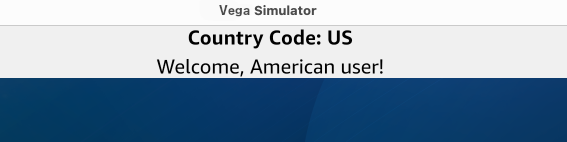
You can display a custom message to the user based on their device’s location. In the following code, you can use:- The
getCountry()method from@amazon-devices/react-native-localizeto get the country from the device. - The
useState()method to save the country code. - A switch case to change the message as per the country code.

Latin American regions
Devices using Latin American regional settings return “UN” instead of “419”, because “419” isn’t a standard country code.getCalendar()
Returns the user’s preferred calendar format.Method type
Example
getTemperatureUnit()
Returns the user’s preferred temperature unit.Method type
Example
getTimeZone()
Returns the user’s current timezone based on the country from their device’s language setting. A simulator returns aUniversal timezone. A TV device returns the timezone set in the device’s settings, such as Europe/London.
For example, this output is with a device’s language setting set to American English.
Method type
Example
uses24HourClock()
Returnstrue if the user prefers a 24-hour clock format, false if the user prefers a 12-hour clock format.
Method type
Example
usesMetricSystem()
Returnstrue if the user prefers the metric measurement system, false if the user prefers imperial.
Method type
Example
usesAutoDateAndTime()
Displays whether or not the device enables the automatic date and time setting.Method type
Example
usesAutoTimeZone()
Displays whether or not the device enables the automatic time zone setting.Method type
Example
Supported versions
Related topics
- Supported Third-Party Libraries and Services
- react-native-device-info — To retrieve device and app information such as OS version, device model, app version, and bundle ID, use the
react-native-device-infopackage alongsidereact-native-localize.
